I direct AI to build production systems, then I break them until they hold.
Two years of this, no degree and no bootcamp. Fifty-plus workflows running in production for real businesses. The skill isn't writing the code. It's knowing exactly what to ask for, and catching what came back wrong before a client does.
I don't write code. I specify, direct, and tear apart what the model gives back.
That's a deliberate choice, not a gap I'm working around. Writing the code was never the bottleneck on any build I've done. Knowing what the system should do, and finding the place where it quietly doesn't, is the whole job.
01
Find the leak
Sit with how the business actually runs and locate where hours and money drain out. Usually it's a handoff nobody owns.
02
Design the system
Break it into inputs and outputs across the tools they already pay for. No new software unless there's no way around it.
03
Read the limits first
New platform means docs, API surface, and rate limits before a single node gets built. Half of what people ask for isn't possible the way they pictured it.
04
Direct with precision
Vague instructions produce plausible garbage. I write the spec tight enough that the output is right the first time or obviously wrong.
05
Try to break it
Null values, duplicate triggers, expired tokens, partial writes, two runs firing at once. If I can't break it, it ships.
06
Own what happens after
Deploy, monitor, and fix it at 2am when the client's API changes something without telling anyone.
Where this overlaps with model evaluation
Two years of directing models to build things I depend on has made me precise about one specific thing: the difference between output that's correct and output that only looks correct.
A workflow that returns a clean JSON response and silently drops every third record passes a first read. So does a model that names the right concept and reasons to the wrong conclusion. I catch invented detail, instructions followed to the letter and missed in substance, and confident answers with nothing underneath them. That's not a side effect of the work. It's the part I do.
Production work
Systems that run daily, with real money and real consequences attached.
Client builds and the internal infrastructure I run my own business on. Every one of these is live, not a mockup.
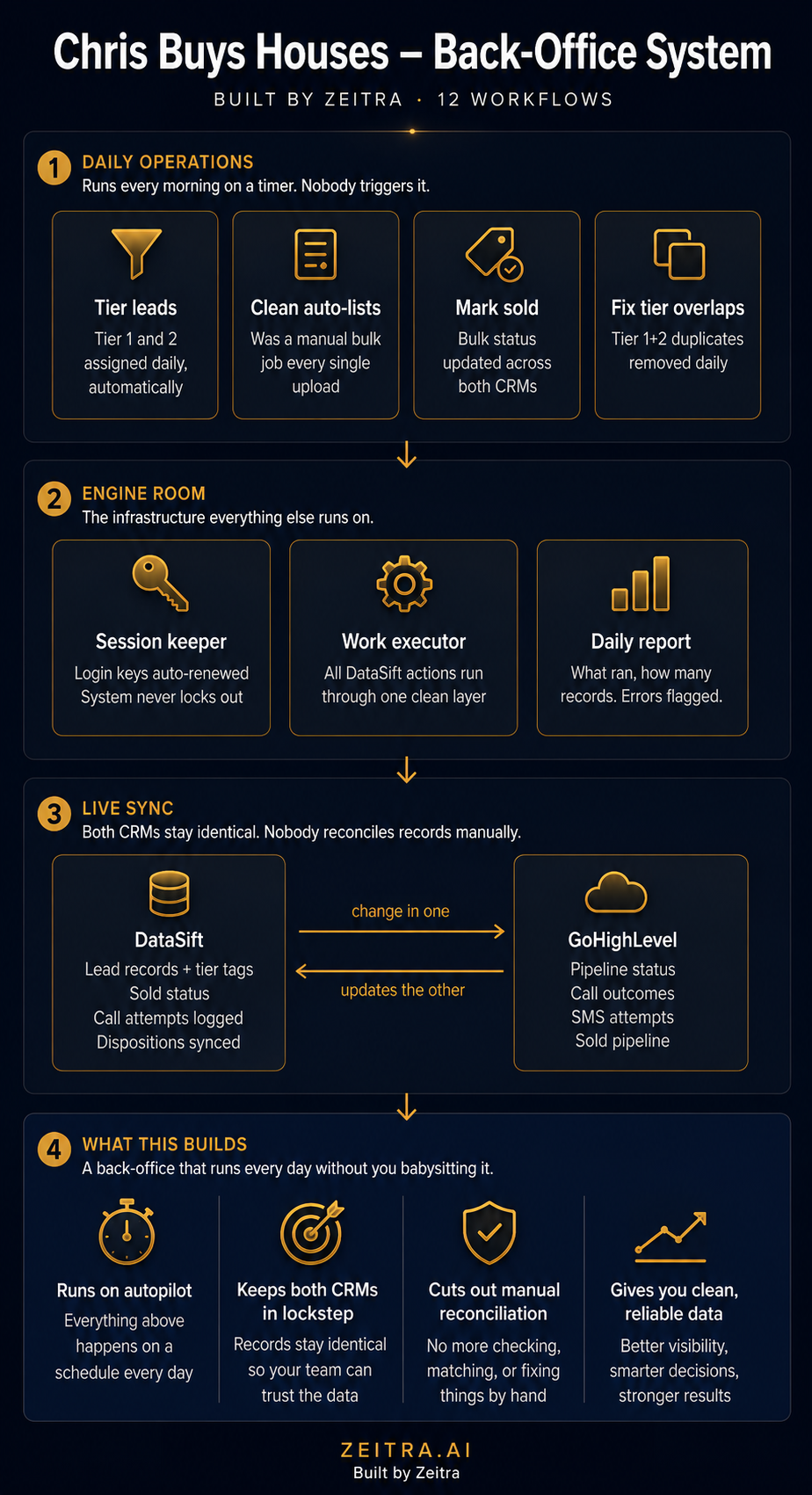
A wholesaling operation ran its pipeline through two platforms that didn't talk. One held property data and list hygiene. The other held conversations and follow-up. Every lead lived in both and matched in neither, so the team reconciled by hand and the owner spent his first hour every morning pushing updates before real work started.
Two-way sync across both platforms. Dispositions, attempt counts, pipeline stages, and sold status all move in both directions on their own.
Bulk operations the data platform didn't support natively. Tier tagging across two priority levels, auto-list cleanup, bulk sold marking, and dedup between overlapping tiers.
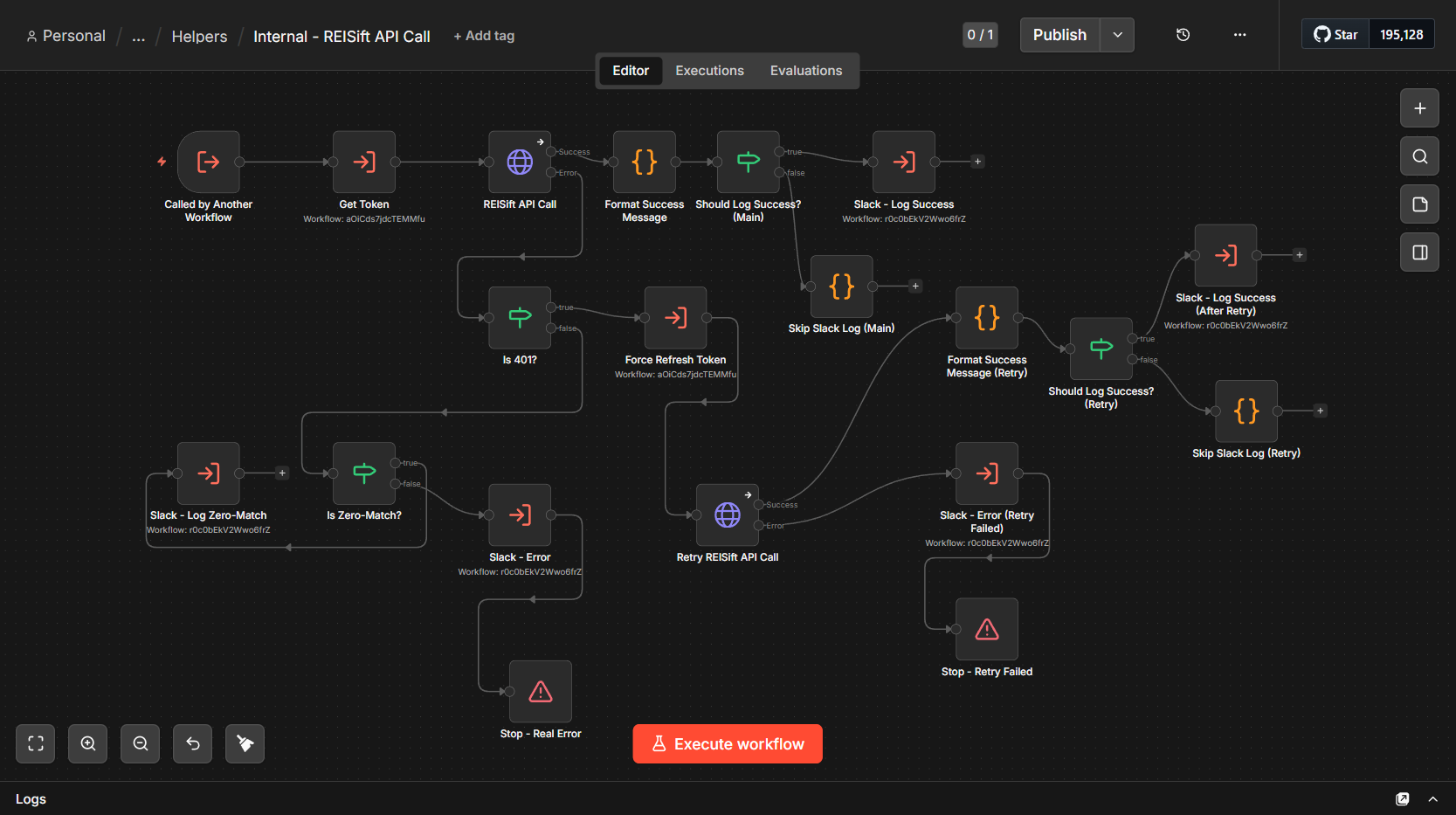
One centralized API helper. Every call routes through it with retry logic, so a failure re-authenticates and tries again before anything gets flagged.
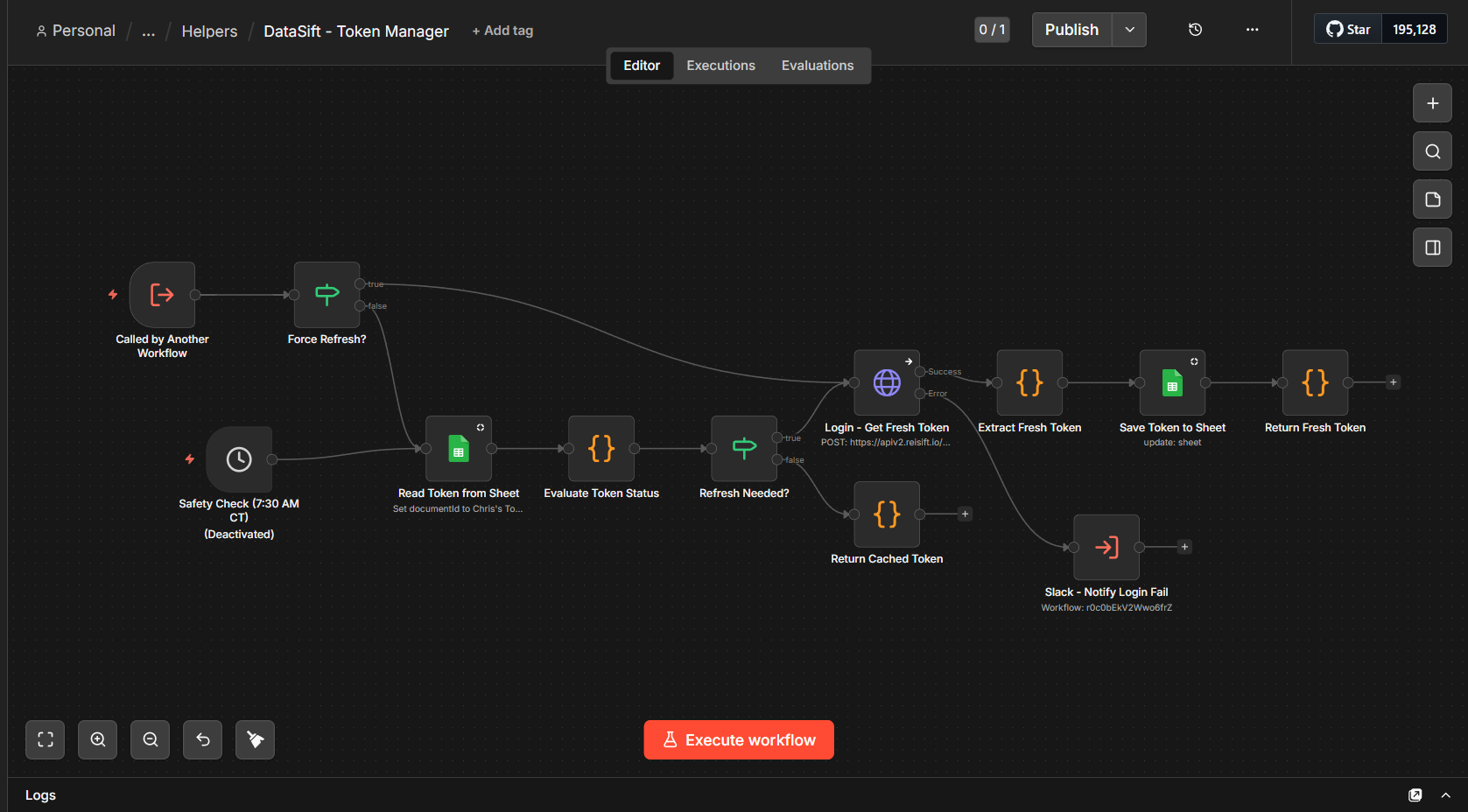
A token manager holding shared state in Google Sheets. All twelve workflows pull the same session token, so two running at once don't fight over sessions or knock each other out.
A Slack notifier doing double duty. Real-time error alerts, plus an 8pm digest with record counts and what ran or didn't.
The hardest part wasn't any single workflow. It was twelve pieces staying in agreement without breaking each other, and one of the platforms had no public API for what we needed, so I worked against its internal endpoints instead.
System overviewAll 12 workflows, in detail
Cross-system sync
Disposition sync → data platform
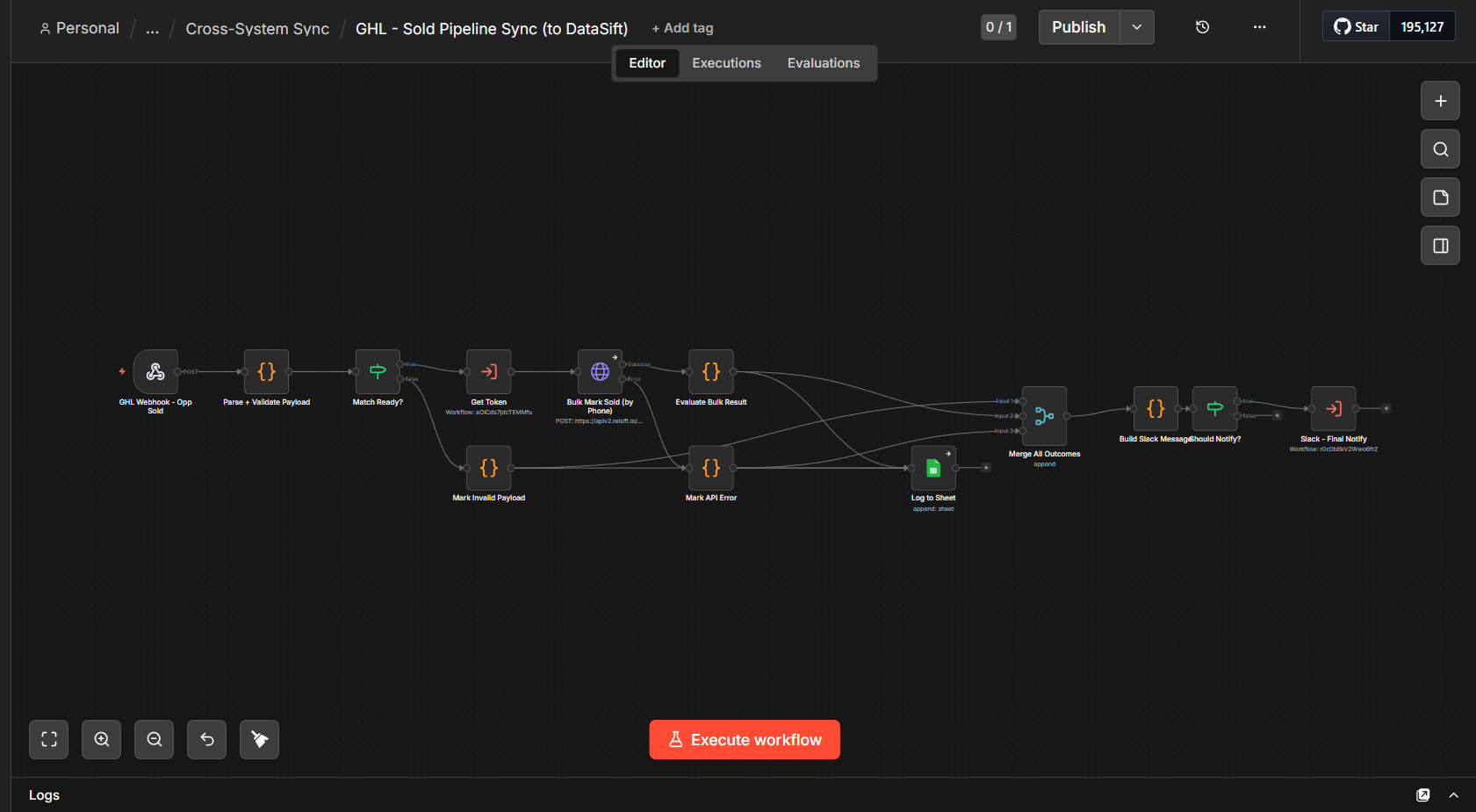
Catches a disposition change via webhook, validates the payload, pulls a fresh token, finds the matching owner by phone, updates their phone status, and logs the result. Not-found and API errors get logged on separate paths instead of failing silently.
Attempt sync → data platform
Tracks call and SMS attempts back into the property record, counting each channel separately. Unmatched properties get marked and reported rather than dropped.
Sold pipeline sync → data platform
Hardest one in the build. Both platforms had their own definition of "sold" and getting those to agree took longer than most of the other workflows combined. Carries its own token refresh.
Sold sync → CRM
The reverse direction. Looks up the contact, finds the matching opportunity, tags it, and moves the stage. Handles the contact existing without an opportunity, and the contact not existing at all.
Daily batch operations
Tier 1 tagging
Scheduled. Pulls leads meeting Tier 1 criteria and tags them in bulk through the API helper. This replaced something the owner did by hand every morning.
Tier 2 tagging
Same pattern against different list criteria. Runs immediately after Tier 1.
Tier overlap dedup
If a lead qualifies for both tiers it should only show as Tier 1. Strips the lower tag so the team isn't working duplicates across priority lists.
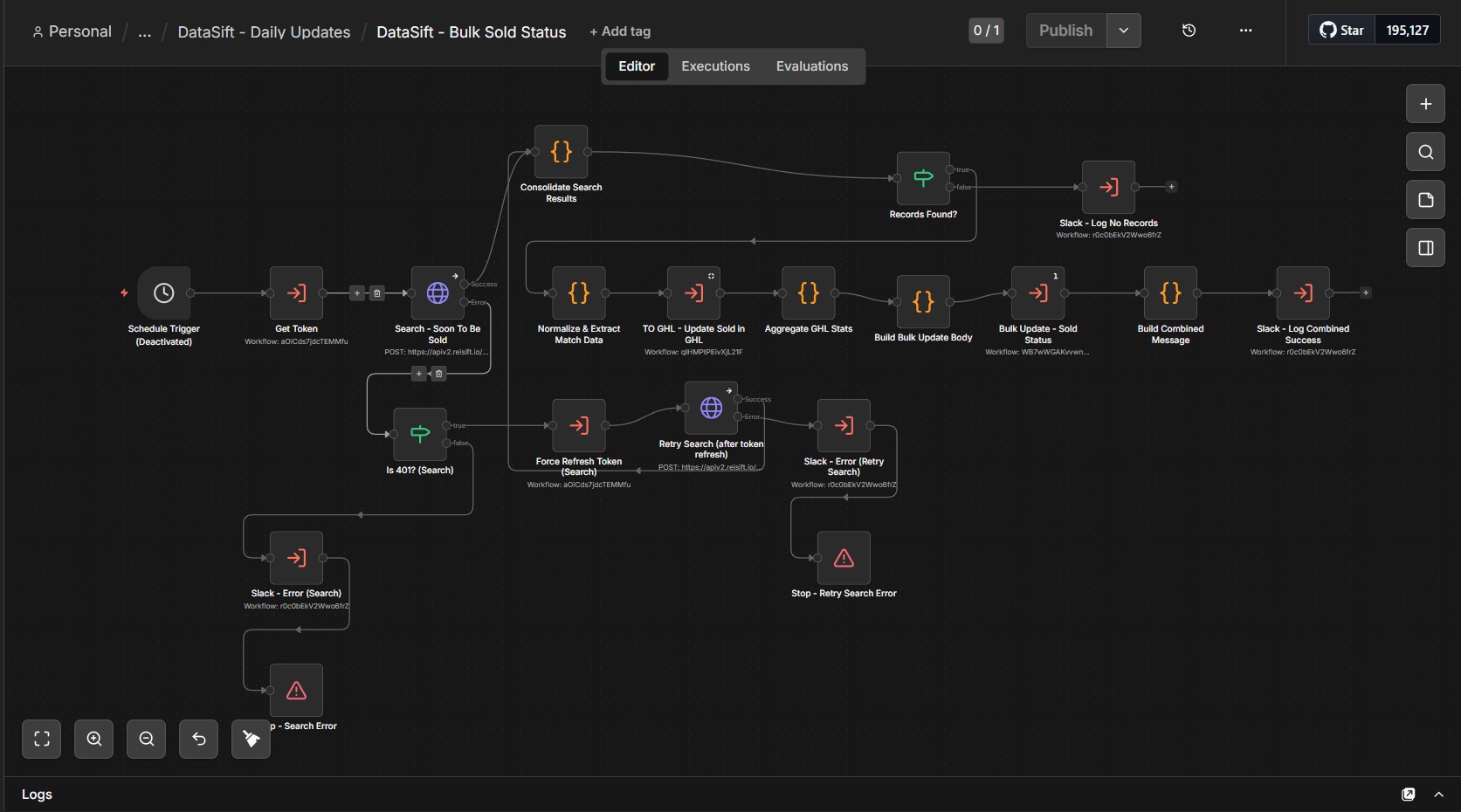
Bulk sold status
Most complex of the daily jobs. Finds soon-to-be-sold records, normalizes them, pushes status to the CRM, then bulk-marks the source. On a 401 it force-refreshes and retries before alerting anyone.
Auto-list cleanup
Scheduled removal of records that no longer belong in the platform's generated lists. Runs through the same API helper as everything else.
Infrastructure
Token manager
The backbone. Reads the current token from a shared sheet, checks validity, and either hands it back or re-authenticates for a fresh one. The sheet is the shared state that keeps concurrent runs from clobbering each other. Daily safety check plus an alert if login ever fails.
Centralized API helper
Every action against the data platform routes through this one workflow. Separate logging paths for zero-match, real errors, and retry failures, so a quiet mismatch never gets read as an outage.
Slack notifier
Real-time errors from any workflow, plus a scheduled end-of-day digest. If the digest itself fails, that error routes to the error channel too.
Token manager, n8n canvasCentralized API helper, n8n canvasBulk sold status, n8n canvasSold pipeline sync, n8n canvas
Live, try it
Lead rescue system
5 workflows · public demo you can run yourself in about three minutes
A pipe bursts at 2am. The homeowner calls the first plumber on Google and it rings out. Almost nobody leaves a voicemail. They call the next name, and that job is gone before the first shop wakes up.
So I built the demo instead of a deck. Brasswick Plumbing Co. is a fictional shop. The system behind it is real and running. Fill the form at 11pm or call and let it ring, and you get answered in under sixty seconds. Then flip sides, open the owner dashboard, and find yourself at the top of the pipeline with every automated touch logged.
One webhook that decides everything up front and fans out into seven paths.
Safety before sales. Report a gas smell and the form stops cold, tells you to leave and call 911, and submits nothing. That's the one path where doing nothing is the right answer.
An emergency page that repeats every sixty seconds until a human acknowledges it.
A follow-up sequence that re-reads the record before every send and shuts off the moment you reply.
Delete your own test data from the same screen when you're done.
The hardest part was honesty. It'd be easy to fake the whole thing and let people assume. The site says outright what's real and what's simulated, and every automated message carries the timing it'd have in production. A demo that oversells is a demo people stop trusting halfway down the page.
7+ workflows across scraping, sending, and two follow-up stages · runs every weekday
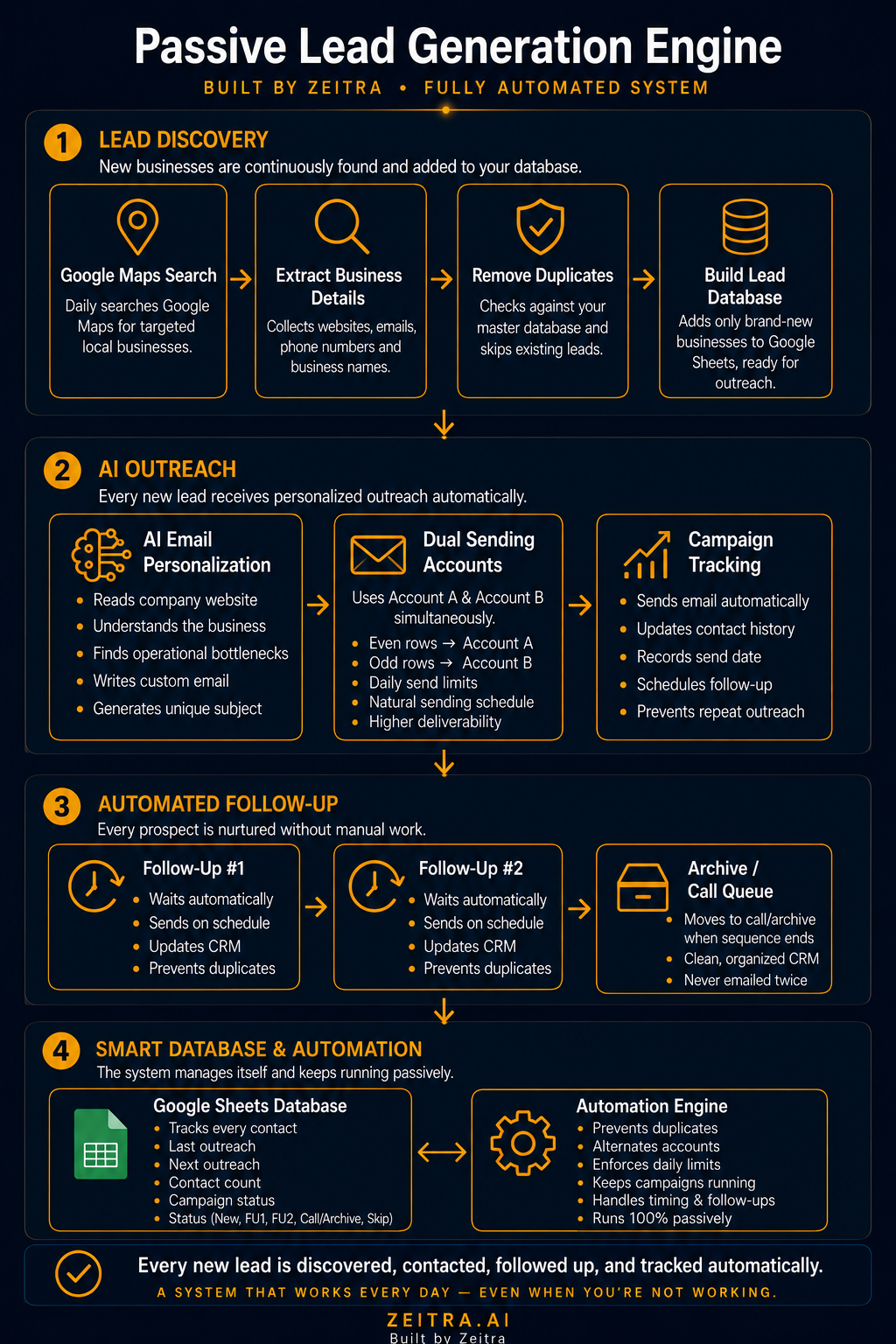
A Maps scraper feeds a lead sheet, and a two-account sending system writes and delivers personalized cold email with automated follow-ups. The scraper is a free stand-in for a paid lead database, which is what you build when you're starting on nothing. Paid sources plug into the same pipeline without changing anything downstream.
Scraper runs nightly, loops search queries, dedupes against existing rows, and appends clean leads.
Every email gets written from the prospect's actual business. No templates on first touch.
Two sending accounts on staggered windows so they never fire together, with cross-account dedup so nobody gets hit twice.
A hard daily cap counted across both accounts and all three stages, because volume that trips a spam threshold costs more than it earns.
A send failure writes a failure status instead of falsely marking the lead contacted.
System overviewPipeline breakdown
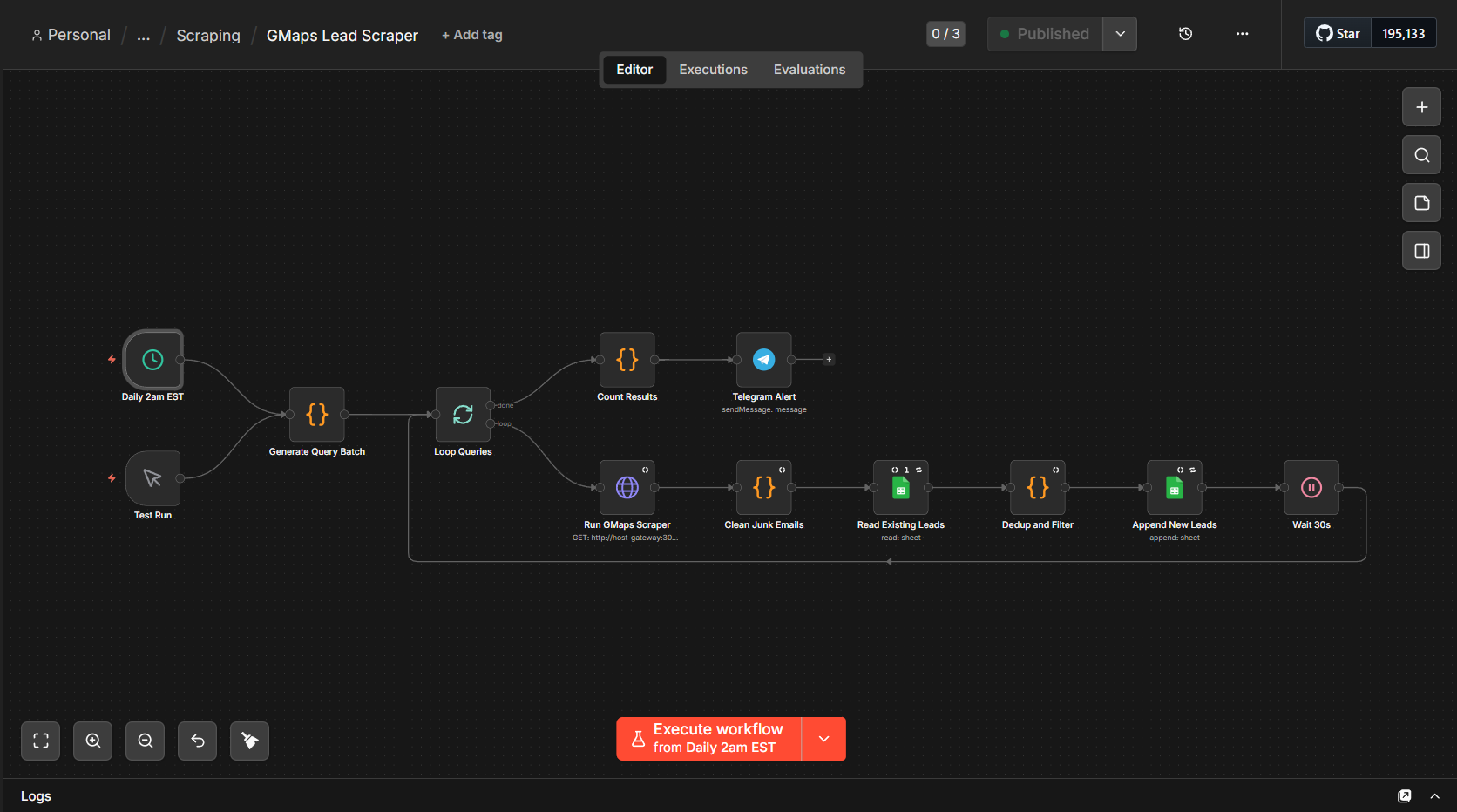
Maps lead scraper
Runs nightly. Generates niche and location query combinations, hits a self-hosted scraper on the VPS, strips junk addresses, dedupes against the sheet, and appends what's new. A wait between queries keeps it from getting rate-limited.
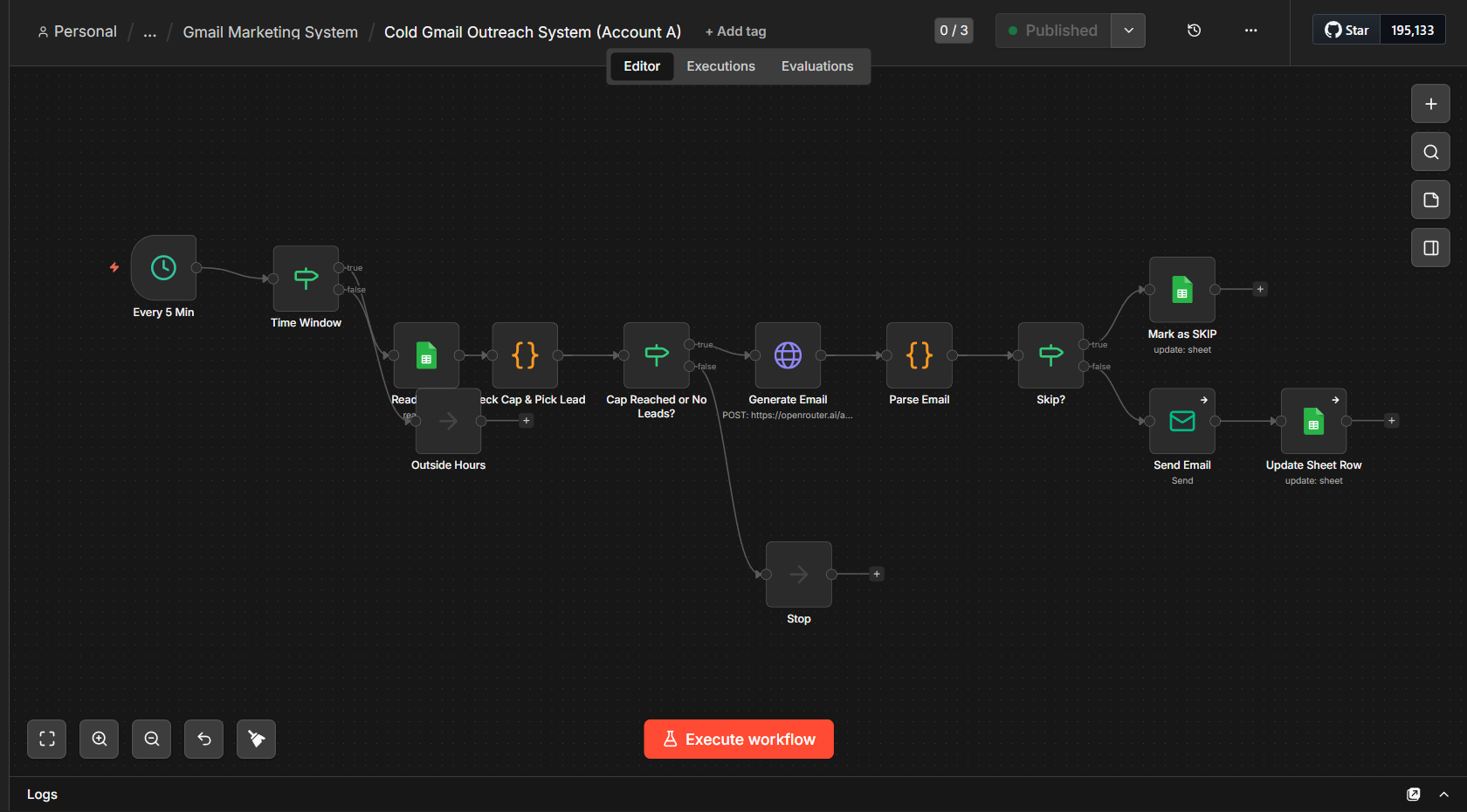
Cold send, account A
Fires on a short interval inside its window on weekdays. Reads the sheet, picks the next unsent lead, checks the daily cap. If there's room, the model writes the email from that business's own details, and a sanity gate catches anything malformed before it goes out.
Follow-up one
Picks leads due for a first follow-up based on days since the cold send. Carries a single link. If nothing's due it stops cleanly instead of running dry.
Follow-up two
Same structure, bow-out copy, no link. Last touch in the sequence, then the row gets archived.
Account B
Identical logic on its own rows and its own sending account, with separate windows. Doubles output without pushing either account past its limits.
Cold send, n8n canvasMaps scraper, n8n canvas
Internal, in production
Lead scout and classifier
Parent pipeline plus a classifier sub-workflow · runs continuously
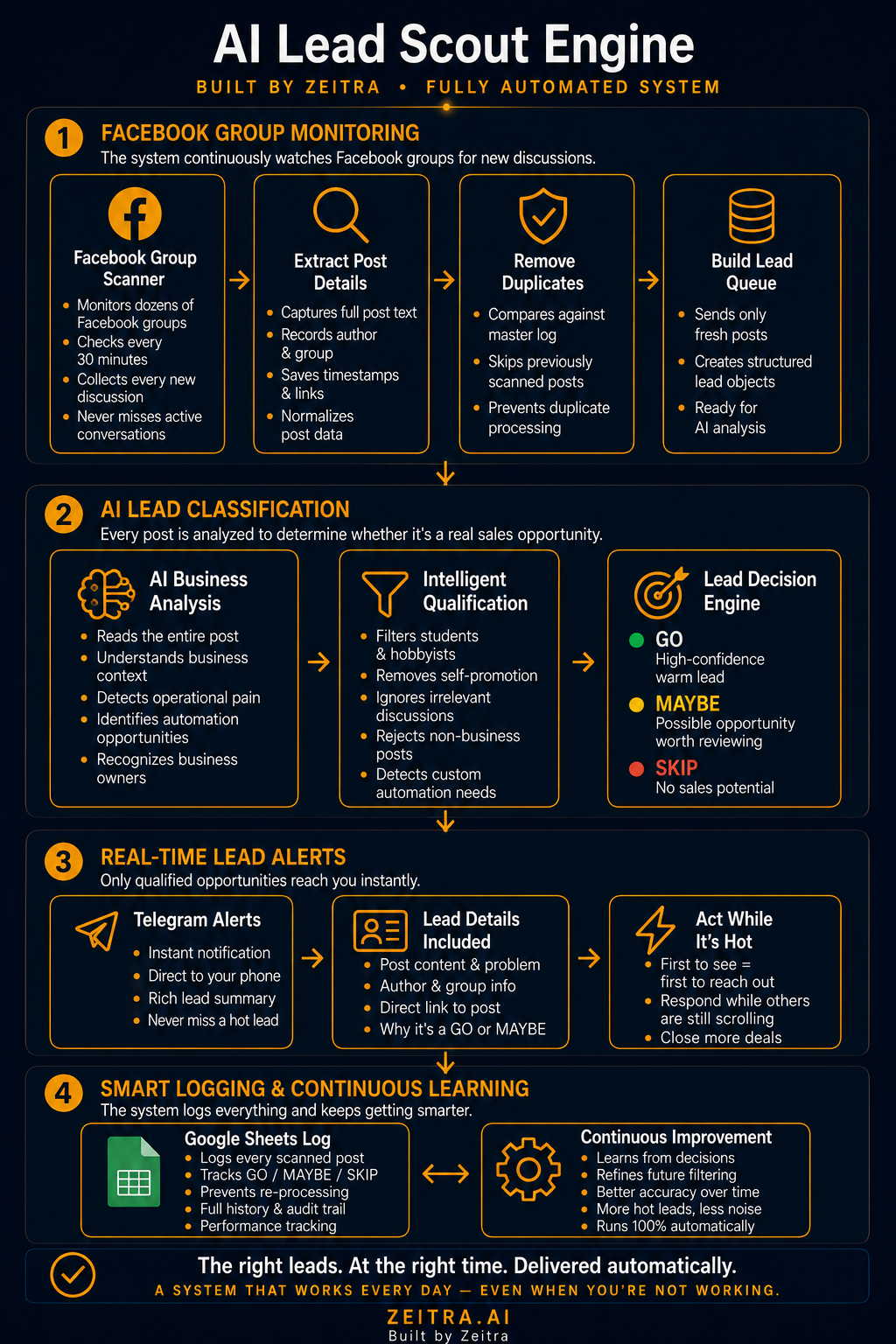
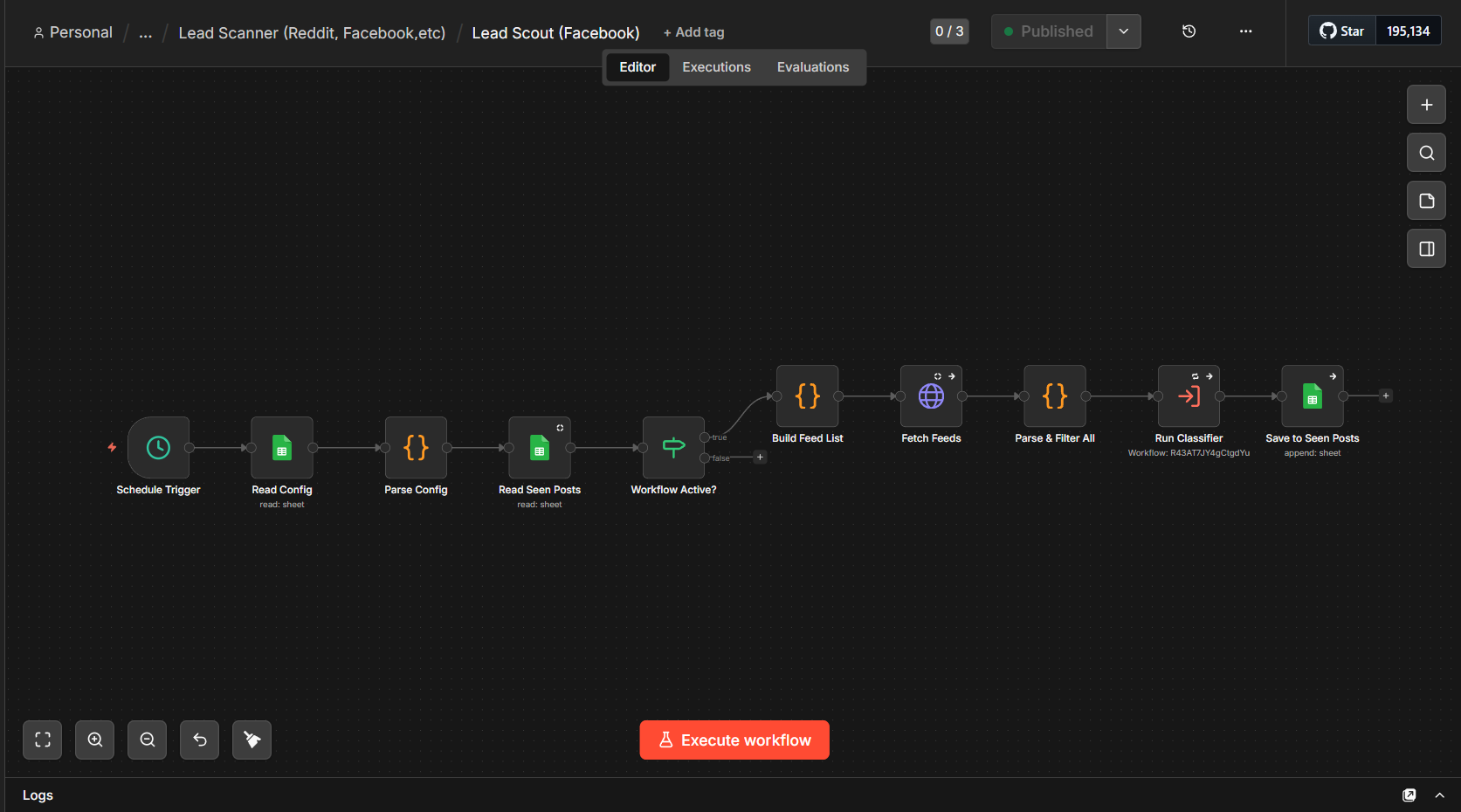
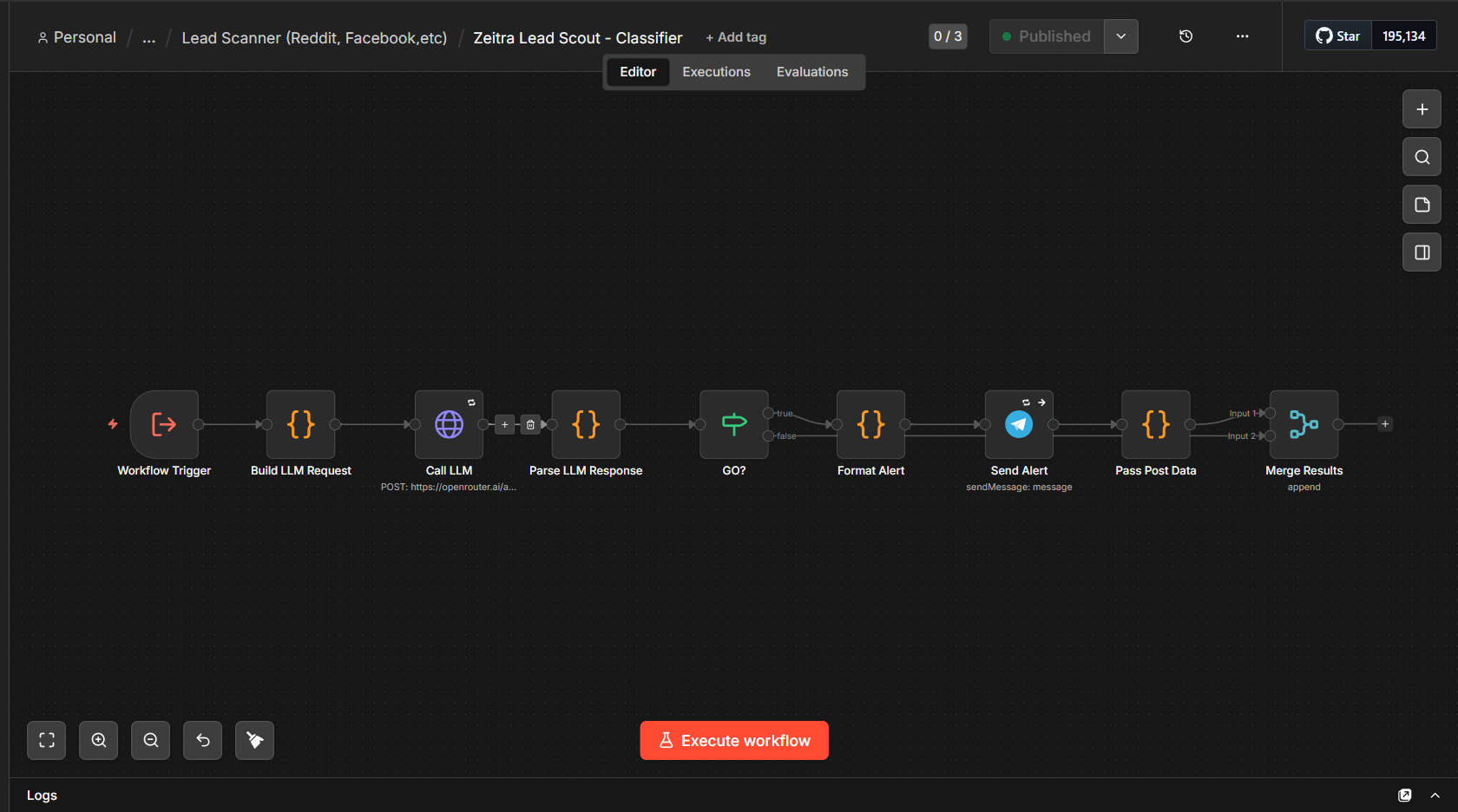
Watches twenty Facebook groups for people describing a problem I can solve. Feeds get parsed, unseen posts go to a classifier, and the classifier decides GO, MAYBE, or SKIP based on actual buying signals rather than keyword matches. Anything that comes back GO fires a Telegram alert with the reasoning and a direct link. The same architecture runs against Reddit on its own feed set.
A dedup sheet so no post ever surfaces twice.
Classification reasoning travels with the alert, so I can tell whether to trust it without opening the post.
The classifier prompt took more than ten iterations to get false positives from around 90% down to something usable. That tuning was the entire build.
System overviewScout and classifier detail
Parent pipeline
Reads a config sheet for the group list and settings, loads the seen-posts sheet, and checks whether it's meant to be running. Builds feed URLs, fetches, parses, filters, and hands each unseen post to the classifier as a sub-workflow. Classified posts get written back so they never repeat.
Classifier
Builds the request from the post plus the classification prompt, sends it to the model, and parses back a verdict with reasoning. On a GO it formats and sends the alert. Everything merges back to the parent regardless of verdict so the dedup record stays complete.
Parent pipeline, n8n canvasClassifier, n8n canvas
Demonstration builds
Working systems built to show a pattern, not to sell a mockup.
Real APIs, real routing, real model calls. Each one has a recorded walkthrough where I open the canvas and explain what every node does and why.
Demo
Client onboarding
One form submission builds a Drive folder structure, creates a Trello card with a checklist, sends a branded welcome email, logs to Sheets, and posts to Slack. Every external node has an error path so nothing fails quietly. A dedup check catches re-submissions before any of it runs.
A Shopify order arrives with customization buried in the notes field as freeform text. The model pulls out size, material, color, and engraving into separate fields, creates a structured production task, and confirms the specs back to the buyer. The routing was easy. Getting reliable structure out of whatever a customer types was not.
Watches an inbox for client change requests. The model reads each one for what's being asked, which project it belongs to, and how urgent it is. Urgent ones page the owner immediately. The classification is the whole point, since "just checking in" and "this breaks our launch tomorrow" look similar until you read them properly.
Not every email deserves a CRM record. Marketing and automated noise get filtered first, then the remainder gets read for sender, intent, and urgency and written to Notion with context. Without that first filter you're just moving your inbox somewhere else and calling it a pipeline.
Inbound form submissions get normalized so the source platform doesn't matter, scored on budget signals and urgency, then logged with the score and the reasoning behind it. Swap the trigger and everything downstream still works.
Every diagram on this page is the real canvas, exported from the instance the workflow runs on. Nothing here is a redrawn illustration of something that doesn't exist. If a build is described as running daily, it ran today.
Stack
Everything here I learned by building something real with it.
No certifications behind any of it. If a client's stack runs on something I haven't touched, I'll read the docs and API limits first and tell them straight if it can't be automated well.
Twenty years old. Started the business at nineteen, straight out of high school.
Education
Program
General Business, Southern New Hampshire University
Format
Competency-based, project-assessed. Coursework is completed and revised until it meets a mastery standard.
Grading
Marked MA (mastered) rather than on a letter scale. The program issues no GPA by design. SNHU's transcript key rates MA as equivalent to an A.
Status
In progress, remote
How I got here
I grew up taking things apart to find out how they worked, and never stopped. No formal training in any of this. When something didn't make sense I'd read until it did, and that turned out to be the only method I needed.
When AI got serious I went all in on it. I taught myself automation, integration, scraping, deployment, pricing, and client operations, and I run all of it myself. First real client build was twelve interconnected workflows against a platform with no public API. I'd never built anything that size before I started it.
I also work a retail job while I build this. That part isn't glamorous and I'm not going to pretend otherwise.
What I'm looking for
Remote contract or part-time work where the thing being paid for is judgment. AI evaluation and red-teaming, automation and integration builds, or systems work at a company that moves fast. I'm not looking for a title and I don't need a chair to sit in from nine to five to prove I'm working.
Separately, I take on builds through my own business at zeitra.ai, scoped and quoted up front.
Contact
Tell me what's broken and I'll tell you if I can fix it.
Fastest way to reach me is email. If you'd rather see how I think before you write, the walkthroughs are the honest version, canvas open and nothing edited out.